Itch Insights

What is HubSpot Sales Hub?

HubSpot Sales Hub is powerful sales software built to help your team sell more efficiently, create better customer relationships, and close deals faster.


With tools for pipeline management, email tracking, meeting scheduling, automation, and reporting, it gives your sales team everything they need to stay organized, save time, and focus on the right opportunities.


Whether you want to streamline your sales process or improve performance across the team, HubSpot Sales Hub helps you turn more leads into customers.

Sales Hub helps you close more deals, strengthen relationships, and manage your pipeline more effectively.

Your Guide to HubSpot Sales Hub

HubSpot Sales Hub helps companies create a more structured sales process, strengthen collaboration between marketing and sales, and give salespeople the tools they need to close more deals. With a single, unified platform, you’ll have a comprehensive overview of your pipeline, activities, follow-ups, and reporting.

In this guide, we’ll walk you through HubSpot Sales Hub, the different pricing plans, and the key features of the Starter, Professional, and Enterprise plans. You’ll also get help choosing the right plan and assessing whether HubSpot is the right choice for your business.

In this guide

What is HubSpot Sales Hub?

Sales Hub offers the tools you need to boost productivity, shorten sales cycles, and, ultimately, make the sales process even more human and personal. It all happens on a single, user-friendly platform.

Sales Hub enhances your sales process and eliminates friction by bringing all your tools and data together in one place. This makes things easy and straightforward, and minimizes the chance of losing leads along the way.

But sales rarely stands alone. Sales Hub is part of your growth platform in HubSpot, where sales works closely with marketing, service, and data. When these teams work together, your salespeople gain the full context of the customer—from the first marketing touchpoint to the closed deal and beyond into the customer relationship.

That’s why HubSpot is, in many ways, a perfect all-in-one solution that brings all your efforts together in one place.

Do you already know what HubSpot is all about? If not, we recommend starting by reading this guide.

What HubSpot Sales Hub Plans Are Available?

HubSpot Sales Hub helps you get a complete overview of your leads, automate your tasks, track every interaction when your leads engage with your content, and makes it easy to follow up on leads.


In short, it becomes much easier to help your leads right where they are in the customer journey. And perhaps most importantly, HubSpot’s many tools and automations allow you to free up more time for what you do best—namely, sales


HubSpot Sales Hub comes in three different plans, which become progressively more complex and require progressively higher investments:


  • Sales Hub Starter: for smaller teams that want to centralize their sales activities in one place and need the essential features to keep sales moving.

  • Sales Hub Professional: for more experienced salespeople to manage and optimize current sales activities. This is by far the most popular plan and meets the needs of the vast majority of businesses.

  • Sales Hub Enterprise: the full suite of sales tools for large sales teams that require a comprehensive contact database.

The three different solutions give you access to various tools and open up the possibility of significantly optimizing your sales processes. Each package is designed to fit different budgets and addresses companies’ various sales-related challenges and ambitions. This means you can find the package that perfectly suits your needs, whether you’re part of a small business, a multinational enterprise—or somewhere in between.


We’ll dive deeper into the three solutions below. We’ll start with a broad overview so you can quickly see the differences between the three solutions—which will hopefully make it easier for you to assess which one best suits your needs. Next, we’ll take a closer look at the individual features you’ll have access to in the three Hubs.


Otherwise, we’re always ready to guide you based on your unique needs, so you get exactly the right solution—no more, no less.

Contact us so we can work together to determine your HubSpot needs

What Features Are Included in HubSpot Sales Hub?

With Starter, Professional, and Enterprise, you get access to a wide range of features. Some of the features available in multiple plans may differ from one another—for example, in terms of quantity. For instance, with the Starter plan, you can create up to 10 dashboards, each displaying 10 reports.

If you then upgrade to Professional, you’ll instead be able to create up to 25 dashboards, each with 30 reports. The difference can therefore be noticeable in some of the tools, and it’s often specific features or limitations that tip the scales when a company has to choose between two Hubs.

HubSpot is constantly adding new and improved features, so it would be nearly impossible to provide an exhaustive overview. That’s why we’ve selected a number of key features, which we’ve listed in a table below, to give you a sense of the differences between the three package options. We’ll go into a bit more detail about them later on.

What Features are Included in HubSpot Sales Hub?

Sales Hub Starter provides you and your sales team with all the tools you need to keep sales moving, shorten the sales cycle, and improve your close rates.

This package is perfect for startups or smaller sales teams looking to boost productivity and give lead generation a solid boost. This package includes both small and large integrations and features, which means that Sales Hub helps you improve your sales team’s performance at every level—something that’s absolutely essential if you want your sales efforts to run smoothly.

Sales Hub Starter does have some limitations, both in terms of the number of tools and the number of users, for example. However, the package’s many basic tools will still help boost your sales results.

As the name suggests, this package provides the best start for your company’s continued growth in sales. Best of all, all your sales activities are consolidated on a single platform, and your sales reps can access the same information—such as leads. This means you can better manage customers and leads, thereby strengthening your sales process. And on top of that, you get HubSpot CRM completely free.

If you later find that you need access to more tools, it’s fortunately easy to upgrade to either Pro or Enterprise—and all your existing data in HubSpot will, of course, be transferred over, so nothing falls through the cracks.

Here, you can explore some of the tools included in Sales Hub Starter that can help boost your sales efforts and strengthen your communication with your customers and leads.

Features in

Sales Hub Starter

Live Chat

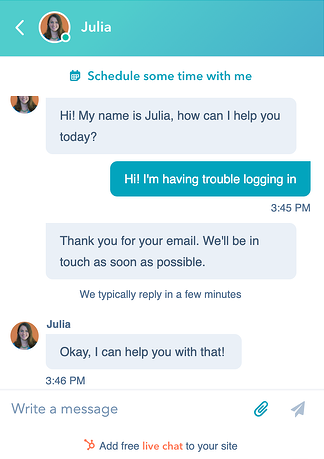
Live chat is the ultimate tool for engaging with visitors to your website. Find out what your visitors are missing or looking for. Optimize and improve your site so that they—and other visitors—have an even better experience the next time they visit.

Live chat also comes with an obligation. Be sure to respond immediately—or at least let them know how long the response time will be—if you want to avoid disappointing them.

Build a closer relationship and provide personalized service so your visitors feel seen and heard.

Live chat

Meeting Scheduling

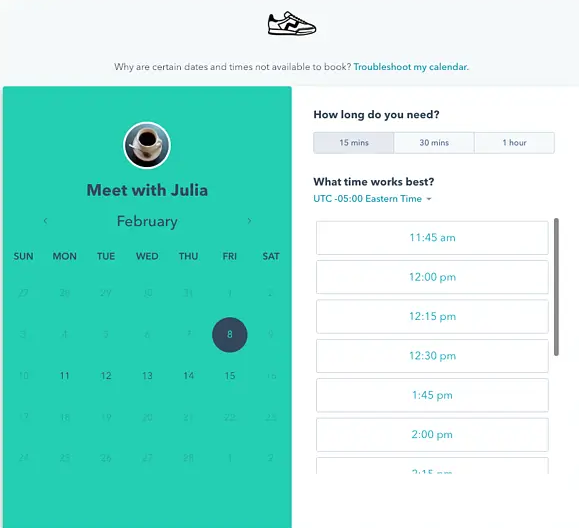
Meeting scheduling is yet another gift for the sales team. Embed a calendar directly on your website or send a link to leads so they can book the exact time that works for them.

This saves time and eliminates unnecessary back-and-forth emails.

Mødebooker

Documents

Documents makes it easy and straightforward to create a library of documents and content. Here, your team can upload and share documents with your leads, and these documents are accessible to everyone on the team.

1:1 email

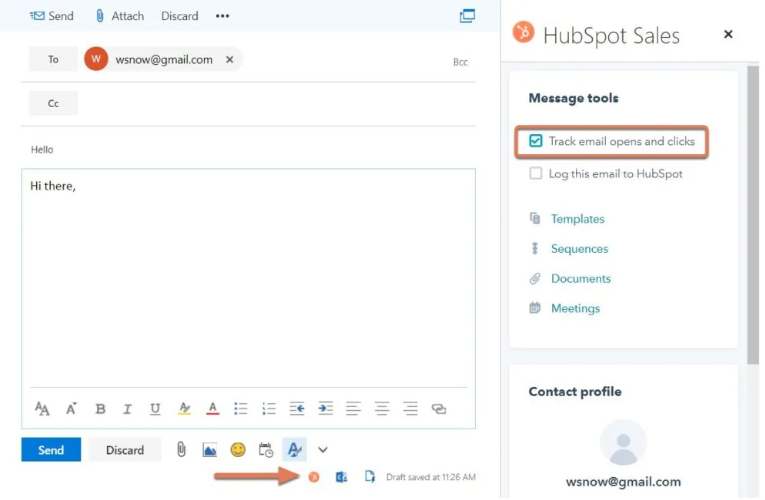
Sales Hub lets you send emails through HubSpot. You can also integrate your own email provider with HubSpot and track your emails directly in HubSpot.

In addition to sending emails to individual contacts and your team, you can also reply to emails using this tool.

For example, you can set it up to receive a notification when your leads open your emails. This makes it easier to track your leads—and figure out where you might be losing them along the customer journey.

1:1 e-mails

Call Routing

With Sales Hub or Service Hub, you can set up routing rules so that incoming emails and chat messages are automatically sent directly to selected users and teams. This way, you can ensure that leads or customers are never overlooked due to internal misunderstandings about who is handling the matter.

Simple Automation

Improve your team's efficiency by automating business processes with Sales Hub Starter. Automation eliminates many tedious and manual processes, and you can use simple automation within your existing tools to manage your lead follow-ups.

Stripe Integration

This awesome integration makes it easy to invoice your customers directly from their quotes, and you can then send all payments to your integrated Stripe account.

Objectives

With goals, managers can easily set user-specific quotas for their sales and service teams based on templates available in HubSpot. Managers can choose to assign goals at the user, team, or pipeline level.

What Features are Included in Sales Hub Professional?

Sales Hub Professional (Pro) is a comprehensive sales software solution that effectively helps you automate and scale your sales processes. The package transforms your sales processes into an efficient, revenue-generating sales engine.

The package is perfect for those with an already established sales team who want to take the next step up the sales ladder. Sales Hub offers many enhanced sales features that allow you to better manage key elements of the sales process.

Some of the tools that are upgraded—and thus enhance your sales process from Starter to Professional—include Documents, where the Professional plan allows you to upload even more documents. The same applies to Email Templates, where you can now create more. With Calls, the Professional plan lets you make calls for up to 3,000 minutes, and your Stripe integration is also expanded further.

In short, if you want to strengthen your sales process even further, this is the plan you should choose.

Below, we’ve highlighted some of the tools that will help optimize your sales process. We’ll dive into the tools and features that set the Professional plan apart from the Starter plan and make a real difference for your sales team.

Features in

Sales Hub Professional

Sales Analysis

This is a very important tool. If you’re successful at driving traffic, it’s also important that you be able to analyze your data. How else will you improve your sales process?

Take a step back, analyze your process, and optimize it to ensure you’re helping your leads move forward in their customer journey.

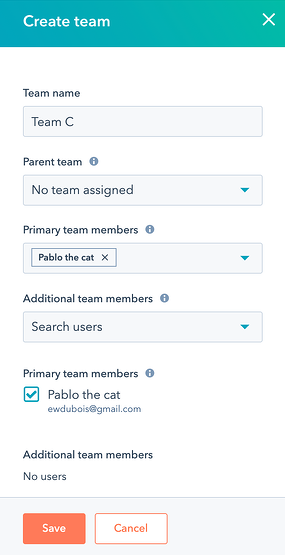
Teams

In HubSpot, Teams lets you organize your users into groups for purposes such as organizational and reporting.

You can have up to ten teams with Sales Hub Professional.

Teams i Sales Hub Pro

Documents

Documents makes it easy and straightforward to create a library of documents and content. Here, your team can upload and share documents with your leads, and these documents are accessible to everyone on the team.

Playbooks

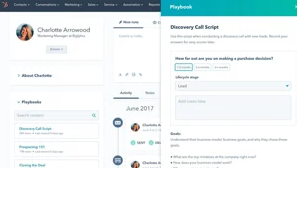
Make sure that both your sales and service teams are well-equipped for the job. Create customized playbooks so you can guide your team members through, for example, interactive content that appears in Contact, under Company, and in Tickets.

If your company uses Slack, you can also easily integrate it with the HubSpot platform.

You can create up to five Playbooks and include notes in each one.

Playbooks

eSignature

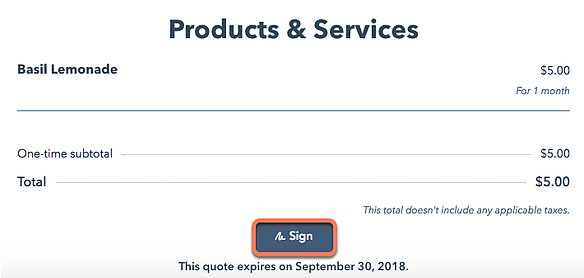
An e-signature, or electronic signature, is a person’s electronic consent to the terms of a specific document. It carries the same legal weight as a written signature. eSignatures are recognized as valid and legal in many countries, such as the EU, the UK, the US, and Canada.

Sales Hub Professional makes it easy for you to sign documents legally and validly with an eSignature.

Use up to 10 signatures per month with Sales Pro.
eSignatur

Calculated Properties

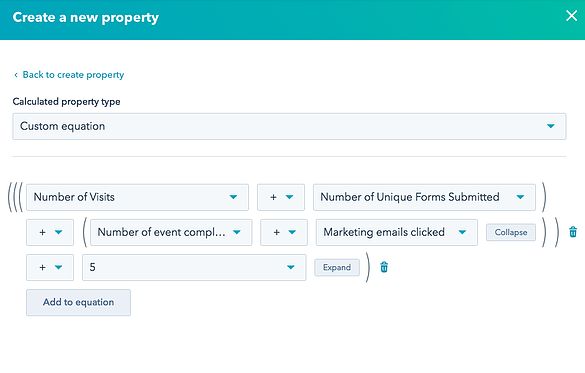
Calculated properties allow you to create custom equations based on numeric properties. You can automatically calculate the minimum, maximum, count, sum, or average value for properties on associated records.

With Sales Professional, you can create five calculated properties.

beregnede egenskaber

What Features are Included in HubSpot Sales Hub Enterprise?

Sales Hub Enterprise is the ultimate CRM platform, providing advanced and large sales teams with the control and flexibility they need to deliver a spot-on sales experience. Plus, the user experience is significantly more intuitive than many other sales CRMs on the market because it was built from the ground up with the needs of enterprise companies in mind. So it’s a win-win.

Take a closer look at some of the features and tools that make this solution truly special.

Features in

Sales Hub Enterprise

User-Defined Objects

Custom objects make it easy to organize your data exactly the way you need. With Sales Hub Enterprise, you can create and customize your custom objects without coding.
brugerdefinerede objekter

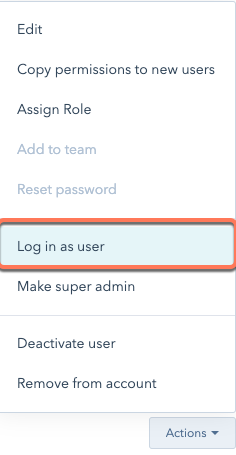
Log in as a user

Help your team troubleshoot your platform. Sales Hub Enterprise allows you to log in as a user with super-admin permissions.

Log in as a super-admin user with two-factor authentication, which allows you to log in as other users. You can use this feature to train your team or to ensure that your team members have access to specific tools.

The super admin can also see which users are logged in as other users if you export the security activity history.

Log ind som bruger i HubSpot

Field-level permission

Field-level permissions allow you to grant editing permissions at an entirely different level. Here, administrators can lock the values of specific properties for specific reps. This ensures that everyone on your team can edit exactly what they need to.

Lead Scoring Prediction

With this tool, you can use machine learning algorithms to predict and have HubSpot analyze your customers to determine the likelihood that your open leads will be converted into customers within 90 days.

If your company uses Slack, you can also easily integrate it with the HubSpot platform.

You can create up to five Playbooks and include notes in each one.

Playbooks

Sandbox

Superadmins can create a default sandbox account to test specific features without affecting the main HubSpot account.

For example, you can connect an app to your default sandbox account to test a new integration. When you do this, you can sync data from your main account to test the integration while keeping the data in your main account completely clean.

Single Sign-On

Single sign-on (SSO) allows your team members to access all the systems your company uses through a single account. This makes it easy for everyone, as they only need to log in with a single user account across different platforms, and it also ensures that there aren’t too many users who need access and permissions to the same resources.

Management of Notification Messages

Notifications alert you and your team when specific activities occur on your accounts. This provides valuable insight into how your leads interact with you.

Super administrators in Sales Hub Enterprise can set preferences for default notifications for other users. If a default notification is configured, preferences specified by the individual user will override the default settings. As a super admin, you can therefore choose which notifications you think are important for individual users to be aware of and receive.

Hierarchical Teams

Teams is an important feature in HubSpot and a general feature that all sales reps should use. Teams allow you to organize users into groups for organizational and reporting purposes.

But this feature in Sales Hub Enterprise takes your team structure to the next level. Set up a parent-child relationship between your teams. Members of the parent team can view everything owned by other child teams. These child teams cannot view everything owned by the parent team or by other child teams.

Which HubSpot Sales Hub Package Should You Choose?

There are several factors to consider when choosing between Starter, Professional, and Enterprise for your sales department. Overall, the decision will often depend on your company’s size, features, goals, and needs. It’s a good idea to start by considering the following before choosing a Sales Hub plan:

  • What is your budget?

  • How many people are in the sales department?

  • What are your future opportunities and ambitions?

These questions and scenarios are probably not something you’ll be able to figure out right away. But work through them together with the rest of your team and your company, and consider your future opportunities and ambitions. HubSpot is definitely part of the future—it helps you strengthen your sales efforts through automated and efficient processes.

Do you need to learn more about HubSpot’s many capabilities? Check out the details below and book a HubSpot demo with one of our specialists. Together, we can find the right solution for your business—now and in the future.

What Does HubSpot Sales Hub Cost?

If you're considering HubSpot Sales Hub, the price is, of course, an important factor in your decision.

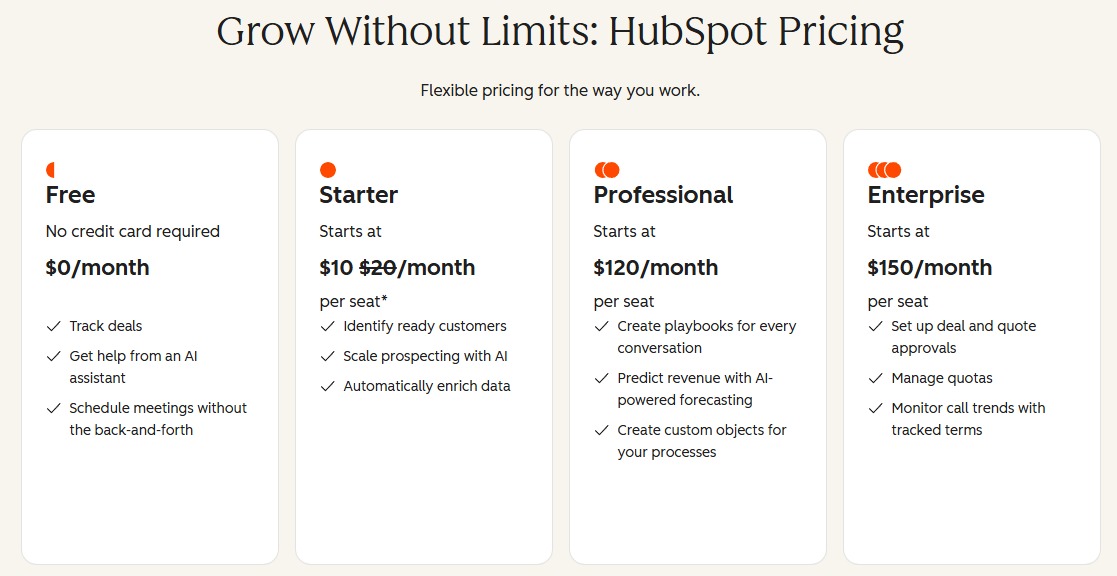
HubSpot has revamped its pricing model, so pricing now depends on the number of users and the plan you choose, rather than a single fixed price per plan. This makes it difficult to give an exact figure here, but it also means that you only pay for what you actually need.

No matter which plan you choose, HubSpot’s CRM is included as part of the solution, and you can always expand from there with additional Hubs as the need arises.

You can find the current prices directly on HubSpot’s website. The great thing about HubSpot is that you’re never locked into a single solution. If you start with the Starter plan, it’s easy to upgrade to Professional or Enterprise if your needs grow.

Book a meeting with us, and we’ll work out together what a solution would cost for your specific needs, based on your number of users and requirements.

How can we help you with HubSpot?

When is HubSpot the Right Choice?

HubSpot is so much more than “just” Sales. You can choose Hubs that specialize in areas such as Service and Marketing. This means you can put together the exact solution that perfectly fits your business’s needs, and it’s easy to adjust your setup when/if your circumstances change.

With HubSpot, you get access to more than 100 features spread across the various Hubs and tiers—and you can integrate the solution with more than 1,000 well-known and trusted tools. When deciding whether or not to choose HubSpot, there are many questions to consider:

  • Does my business focus on generating leads?

  • Does it take several weeks or months to acquire a new customer?

  • Do I have a sales department that works with leads?

  • Do I lack insight into the impact of my marketing efforts?

  • Do I lack a system for managing customer information and sales activities?

  • Is the value of a customer high?

  • Do I want to automate parts of my sales, marketing, and/or service?

  • Do I wish my sales team could work from a single platform that also provides insight into touchpoints with marketing and service?

  • Do I recognize that it takes a better and greater effort to create good, valuable customers?

If you can answer “yes” to one or more of the questions above, then HubSpot is likely a good choice for you. If you’d like specific examples of how HubSpot Sales Hub can create value, click below.

5 Features in HubSpot Sales Hub That Improve Your Sales Process

Why Use a HubSpot partner?

You can certainly get started using HubSpot on your own if you choose the Free or Starter plan. That way, you can get started without receiving an invoice for anything other than the software. But be prepared—you probably won’t get the most out of the system, since you’ll have to set everything up yourself and acquire all the knowledge and skills needed to use HubSpot on your own—and the learning curve is on the steeper side.

If you choose to invest in HubSpot Professional instead, onboarding will be necessary. Here, you can choose between HubSpot’s own standard onboarding or opt to use a partner (that’s us!). HubSpot’s own onboarding offers nothing more than the absolute bare minimum and is a standard solution. This also helps keep the price very competitive.

When you choose to use a partner for onboarding, you receive consulting, training, and guidance tailored to your specific needs and your business. That’s why HubSpot itself recommends using a national partner so you can get the most out of HubSpot from the start.

If you need an Enterprise solution, you’ll need an Enterprise-certified partner (which we are!). The requirements here are high, as the solution is inherently comprehensive and requires a deep understanding of HubSpot.

We offer solutions that cater to all levels of HubSpot. Learn more about us as a HubSpot Partner or the compelling reasons why you should use a partner to implement it.

Our HubSpot services

Get Started with HubSpot

Implementation and Onboarding

We'll make sure your business gets off to a good start with HubSpot and that the right foundation is in place to get the most value out of the platform.
  • Get started quickly with HubSpot
  • Gain insights from a certified HubSpot Partner
  • Get all the quick wins based on over 100 projects
  • Kom hurtigt i gang med HubSpot
  • Få erfaring fra en certificeret HubSpot Partner
  • Få alle quick wins baseret på +100 projekter

Get Started with HubSpot

CRM Migration

There's a lot at stake when you need to migrate your website from one CRM to another. We'll help you move your website to HubSpot with peace of mind.

  • Data Migration and Data Mapping
  • Analysis of Your Existing CRM
  • Sales processes and integrations are included
  • Datamigrering og datamapping
  • Analyse af jeres eksisterende CRM
  • Salgsprocesser og integrationer følger med

Build the Foundation

Data & Setup

We'll set up your data model, pipeline, and reporting so that you always have the overview you need to make the right decisions.

  • Data Model and CRM Structure
  • Pipeline and Deal Stages
  • Dashboards and Reporting
  • Datamodel og CRM-struktur
  • Pipeline og Deal Stages
  • Dashboards og rapportering

Build the Foundation

Integrations

We integrate HubSpot with your other systems so that data syncs automatically, giving you a single, comprehensive view across your teams.

  • Integrate CRM, ERP, financial systems, and more.
  • Less manual labor
  • We support existing and custom integrations
  • Integrer CRM, ERP, økonomisystemer m.fl.
  • Mindre manuelt arbejde
  • Vi understøtter eksisterende og skræddersyede integrationer

Get More Value

HubSpot AI

We'll help you activate and make the most of HubSpot's AI features so you can work smarter and faster across marketing, sales, and customer service.

  • HubSpot Breeze AI and Copilot
  • AI-powered workflows
  • Content Creation with AI
  • HubSpot Breeze AI og Copilot
  • AI-drevne workflows
  • Indholdsproduktion med AI

Get More Value

Strategy

We'll help you make the right strategic choices for your HubSpot setup and ensure that the platform supports the way you and your team work.
  • Find the Right HubSpot Solution
  • Integrate HubSpot throughout your entire organization
  • Discover new opportunities with HubSpot
  • Find den rette HubSpot-løsning
  • Få integreret HubSpot i hele virksomheden
  • Find nye muligheder med HubSpot

Get More Value

Training and Workshops

We organize and tailor training for you or your team on HubSpot’s various Hubs, tools, and features.

  • Tailored to your business and your needs
  • Give your team a solid understanding of HubSpot
  • You can choose either in-person or online classes
  • Tilpasset din virksomhed og det, du har brug for
  • Giv dit team en solid forståelse af HubSpot
  • Du kan både vælge fysisk eller online undervisning

Operations and Development

Support

We'll help you tackle any challenges that may arise along the way and offer ongoing guidance on new features and capabilities in HubSpot.
  • Get fast support for your HubSpot solution
  • Stay up to date on new features and opportunities
  • Get more out of HubSpot and maximize its value
  • Få hurtig support til din HubSpot-løsning
  • Vær på forkant med nye features og muligheder
  • Få større effekt af og udnyt værdien i HubSpot

Operations and Development

HubSpot Audit

We'll take a deep dive into your setup and identify specific ways to optimize your HubSpot setup. Is there anything that needs to be cleaned up, and are there new features you should be using?

  • A comprehensive review of your platform
  • Handover with takeaways in a specific data sheet
  • Fixed price
  • Fuld gennemgang af jeres platform
  • Overlevering med takeaways i konkret dataark
  • Fast pris

We Help You Get Started with HubSpot Sales Hub

Our HubSpot Specialist and Partner, Morten, would be happy to show you Sales Hub in action and provide concrete guidance on how it can strengthen your pipeline and sales processes.
We make it easy

Book a meeting with Morten

Choose a time and date